


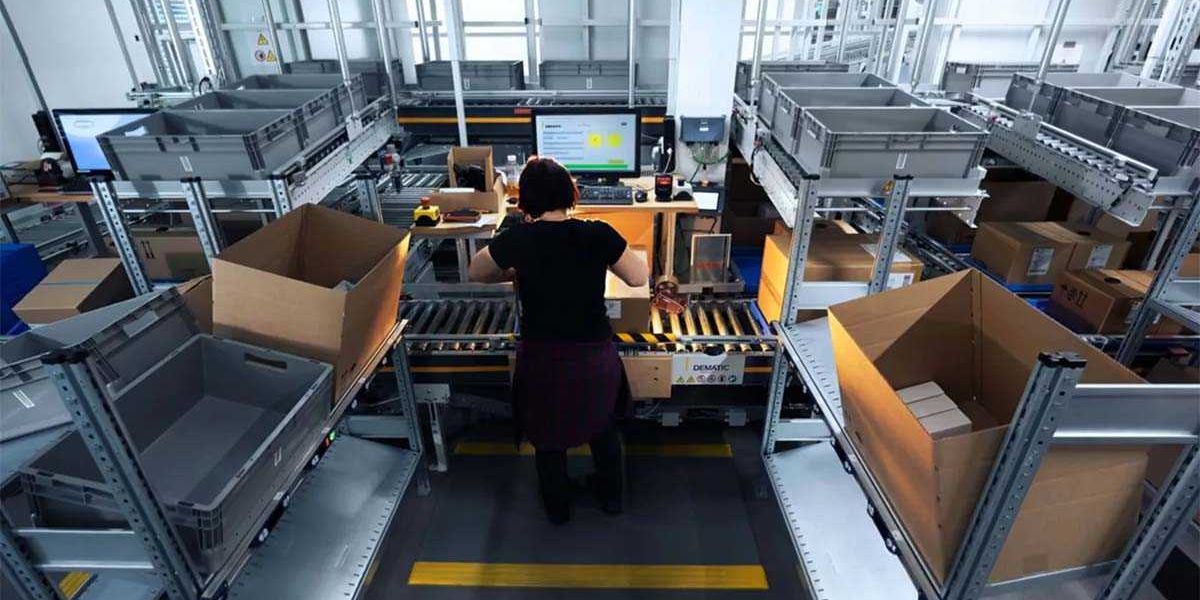
Today’s warehouses are becoming showplaces for modern technology as companies seek to create more flexible, safe, and efficient workflows within their facilities. Warehouses buzzing with autonomous mobile robots (AMRs) or featuring high-density grid-based automated storage and retrieval systems (AS/RS) are becoming increasingly common across the logistics landscape—and they require considerable care and attention when companies go to design and implement the best solutions for the job.
Workstations are essential components of those systems, providing places where associates interact with robotics and automated equipment to perform vital tasks—picking and placing items at a port connected to the AS/RS, for example, or packing items delivered to a station by an AMR. Although they are one small part of the larger system, workstations deserve the same scrutiny during planning and implementation, automation design experts say.
We asked Dan Cahalan, sales director at warehouse automation technology specialist Swisslog, and Ben Ferrell, senior director of product management for high-density case and tote storage solutions at automated material handling solutions provider Dematic, for their insights on what goes into designing the best workstations for today’s modern warehouses. Here are excerpts from our conversation.
DC Velocity: Let’s talk about the best approaches to take when designing warehouse workstations. What are the first steps you take with customers?
Ben Ferrell: The first step in recommending a workstation design is to fully understand the customer’s operation. This means mapping the process the workstation will support, identifying pain points, and having a clear definition of what success looks like.
Early conversations should focus on where the operation is losing time, space, labor efficiency, accuracy, or safety with very specific goals attached. Keeping ROI [return on investment] in mind as early as possible is key when designing a brand-new workstation.
A critical part of this early discovery involves both operations leadership and front-line operators. While leadership provides strategic priorities and performance targets, operators often surface practical, day-to-day insights that don’t appear in standard KPIs [key performance indicators] but can significantly impact the effectiveness of the solution.
Dan Cahalan: Typically, what we start with is understanding the business requirement for the system and the business requirement for an individual at a workstation. So if you’re at a picking port, what is this individual going to be responsible for? Are they going to be responsible for picking an item, scanning it, tagging it, applying a label, putting it in a box, [and/or] building the box? Describing the user process is always the first step. Then, we use that process to determine the approximate user rate [the speed at which an associate will work at a given workstation], and that’s how we determine the total number of workstations needed.
DC Velocity: How do ergonomics come into play, and what are best practices in that regard?
Ferrell: Ergonomics should be built into workstation design from the beginning, not only to protect worker safety but also because strong ergonomic design directly impacts throughput, quality, and employee retention, especially in labor-constrained markets. It also plays a key role in managing fatigue across shifts, helping sustain consistent performance over time. Best practices include minimizing bending, twisting, reaching, lifting, and repetitive motion; keeping products, tools, screens, and scanners within the operator’s optimal work zone; and using adjustable platforms or station features for different worker heights.
Our team uses the Rapid Upper Limb Assessment (RULA) [ergonomic survey tool] to help ensure workstation solutions achieve a low-risk ergonomic score. Fortunately, implementing strategic robotic picking automation solutions reduces manual activities that cause repetitive stress injuries, and these solutions only continue to improve by the day.
Cahalan: Most equipment providers will have “standard” workstations that are designed to cover a wide range of applications—and designed to be widely ergonomically acceptable according to some industry standards—so you can generally trust that a workstation being implemented meets some level of physical ergonomic standards.
The less-frequently considered component of workstation ergonomics is noise. It’s something not every customer considers, but the ones that do take it very seriously. For example, some customers require that the noise level at a workstation be less than 75 decibels.
DC Velocity: How does customer input factor into ergonomics?
Cahalan: Customer input is arguably the largest factor. I previously mentioned standard workstation ergonomics, but a step further is to have a customer that takes ergonomics seriously and demands ergonomic advancement beyond the standard. As an example, I have a customer that takes safety extremely seriously, devoting a considerable amount of engineering effort to ergonomics. That customer has a robust ergonomic standard and challenged us to redesign a standard workstation in such a way that it accommodates all of its ergonomic standards. It is often a matter of how high the customer’s standards are for workstation design in terms of how ergonomically “thoughtful” the workstation will be.
DC Velocity: What are some common mistakes warehouses make when implementing workstations?
Ferrell: The most common mistake we see is treating workstations as an isolated piece of equipment instead of part of a larger fulfillment system. Even a well-designed station can underperform if the two are not aligned.
Another frequent issue we see is underestimating training and change management. No matter how well designed a workstation is, operations will struggle if operators aren’t brought along in the transition.
Other common mistakes include designing for average volume instead of accounting for peak demand; prioritizing speed while overlooking ergonomic risk; failing to account for product variability and SKU [stock-keeping unit] proliferation; and not planning for lifecycle support or future upgrades.
Cahalan: I think some mistakes that people make are projecting their own body into a workspace. Oftentimes, people project themselves into these workspaces without taking the extra effort of using an ergonomic chart or using a human-factors resource of some sort—failing to consider bodies (height, weight, reach) different from theirs. The other thing that happens often is that people will cut small, “penny” corners to save money that could have a massive impact on the ergonomics and on the sustained user rate.
Another mistake people make is forcing the user at a workstation to make too many decisions. Whatever you can do to make it so that the user can stay present with their hands and not have to move around to read a screen—that’s important. A user should only have to go to a screen if something is wrong.
DC Velocity: How do you plan and design for future growth?
Ferrell: Today’s workstations should be designed to be modular, scalable, and flexible. In many cases, systems can operate for 15 to 30 years. Because of these long lifespans, maintaining support and modernization while investing in upgrades if needed is extremely important to the long-term success of the workstation.
SKU proliferation, labor availability, and service expectation changes can all make for a more varied supply chain. Workstations must be designed to reflect this. Some options include:
- Leaving room for additional stations;
- Allowing for future robotic integration at the station;
- Designing layouts that can flex with changing volume;
- Using modular subsystems;
- Building in capacity for peak periods;
- Ensuring software and controls can support new workflows over time.The best workstations don’t just support today’s operation; they also evolve with it. When productivity, ergonomics, scalability, and lifecycle considerations complement each other, it sets operations up for success in the near term while preparing for the future.
Cahalan: I would say, build your system with expansion in mind.
Getting expert, outside input is important as well. The benefit of a single industrial engineer that you, as a customer, could hire is immense—to do time studies, hear from associates about how their experience could be better, [and so forth]. Having someone embedded in the organization to learn those things and help the operation grow over time—someone who is listening, reacting, and managing for continuous improvement—that’s ideal.
